



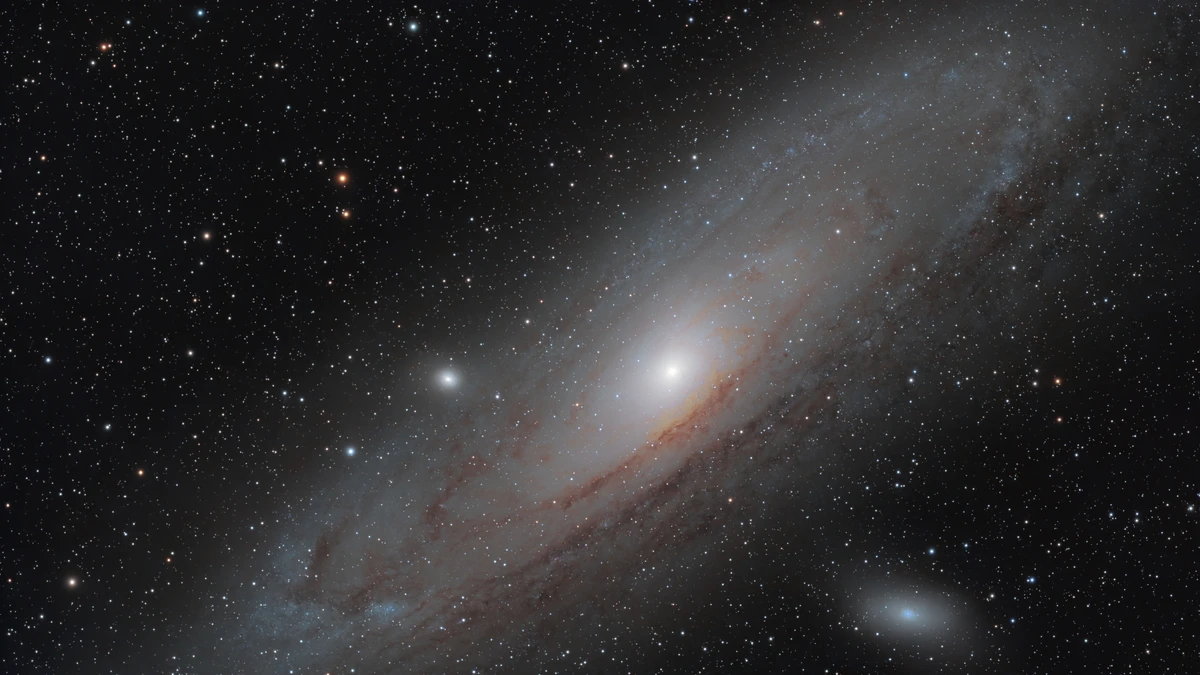
The original ZWO Seestar was a massively popular smart telescope that let astrophotographers minimize gear and setup time. By putting everything you need inside a box small enough to fit in an overhead luggage compartment, the Seestar became accessible not only to professionals but amateurs alike. However, ZWO released the Seestar S50 Pro a few months ago, promising a much-needed upgrade. So how exactly does it hold up, and is it worth upgrading?
First Impressions
After testing the Seestar S30 Pro in February 2026 and loving it, I was really looking forward to testing the flagship model. I’m pretty much a newbie when it comes to astrophotography. I’ve always been intrigued by the night sky and wanted to capture it, but 15 years ago, doing so was vastly different. My budget didn’t allow me to pursue it. A pity, since I used to live on the doorstep of one of the best dark skies in the world: Namibia.
Nowadays, the astrophotography landscape has changed quite considerably. With the introduction of smart scopes, we can all pursue astrophotography and observe the stars even with limited photography knowledge. But it’s not limited to entry-level astrophotographers. The Seestar range of telescopes lets you keep things simple or go all in. With the Seestar S50 Pro, it feels even easier than before.
The Seestar S50 Pro is slightly bigger and heavier than its predecessor, thanks to its larger 8.3-megapixel sensor and improved optics. It also boasts 128 GB of internal storage and a larger-capacity battery to extend your capture time. The larger size also comes with a higher price tag of $999, which may sway entry-level astrophotographers to the $699 Seestar S30 Pro instead. Whichever route you decide, I guarantee you will not be disappointed. It all depends on what your needs are at the end of the day. The Seestar S50 Pro is much larger and heavier than the S30 Pro, so portability becomes an issue. However, this may only matter if you plan to travel with the S50 Pro. That being said, the S50 Pro is still beautifully packaged in a hard-shell foam case, along with a very sturdy mini tripod and the standard accessories. It’s great for a trip out of town, but I’m not sure it’s feasible for an overseas trip. I’m planning on heading to South Africa soon, so I’ll be able to gauge whether it’ll fit on the flight with me, along with my standard camera kit and luggage.
Specifications
The specifications speak for themselves. The S50 Pro boasts both telephoto and wide angle lenses capable of shooting an 8.3-megapixel 2160 × 3840 (4K) image. Compared to the original S50, which could only shoot telephoto images at 1080 × 1920 (HD) with no wide angle lens, this is a significant improvement in both optics and resolution. Furthermore, the optics have been improved to include a 260mm four-element apochromatic lens, giving you a 2.8-degree field of view using the telephoto lens, or a 63-degree field of view when using the 6mm wide angle lens, with no visible artifacts.
Battery capacity has improved significantly, from 6,000 mAh to 10,000 mAh, adding three additional hours of shooting time. Shooting in the UK on cold nights, I noticed no significant battery drain after several hours of continuous shooting. I could’ve easily captured a second session the following night without the need to charge.
The 128 GB of internal storage is also fantastic, since I chose to capture raw images so I could process them on my PC later. Raw images, as everyone knows, eat storage space for breakfast, lunch, and dinner. So the higher-capacity storage is a welcome addition over its predecessor’s 64 GB.
Sensor Size
- Tele: 1/1.2 in, 2.9 μm (8.3 MP)
- Wide: 1/2 in, 1.6 μm (8.3 MP)
Sensor Model
- Tele: OmniVision OS08B10
- Wide: Sony IMX586
Resolution
- Tele: 2160 × 3840 (8.3 MP)
- Wide: 2160 × 3840 (8.3 MP)
Field of View
- Tele: 2.8° (portrait)
- Wide: 63° (portrait)
Aperture
Focal Ratio
Focal Length
Equivalent Focal Length
- Telephoto: 880 mm
- Wide: 35 mm
Optical Lens
- Four-element apochromatic lens (APO), including ED glass
Working Distance
- Tele: 15 m–∞
- Wide angle: 0.1 m–∞
Built-in Filters
- UV/IR-cut filter (telephoto + wide angle)
- Dual-band light pollution filter: OIII 30 nm / Hα 20 nm (telephoto only)
- Dark frame filter (telephoto only)
Processing Your Images
Since reviewing the Seestar S30 Pro, the astrophotography bug bit hard, and I’ve been scouring Reddit forums and websites for astrophotography tools to process images. If you choose the more advanced route and don’t rely on the Seestar mobile app to process your images, you can connect your S50 Pro to your computer, download the FITS raw files, and process them in the software of your choice, whether that’s apps like Siril, PixInsight, or others. I landed on two free applications: Stacking Wizard to stack the individual photos and Astro Wizard to process the photos. I would highly recommend also investing in BlurXTerminator to recover fine details in the processed image. It’s available as a PixInsight plugin or a standalone tool and costs $99.95. The results are incredible, and you get full artistic control over the look and feel of your images. You can also keep things simple and process everything in the Seestar mobile app, which yields great results without the extra time of downloading all the files and going through the full stacking and editing process.
Another interesting addition to the S50 Pro is the open ASCOM Alpaca protocol, which lets you connect third-party software such as N.I.N.A. to the telescope for automated workflows, remote control, and image downloads. By connecting your S50 Pro to your home’s Wi-Fi in Station Mode, you can then use your computer to connect to the telescope and use it from the comfort of your sofa or your office. I briefly attempted to test this workflow, but for some reason I couldn’t connect to my home Wi-Fi. I still need to figure out whether this was a bug in the Seestar app or an issue with my home router. Nevertheless, I was able to connect my laptop to the Seestar’s Wi-Fi directly, which allowed N.I.N.A. to find and control the telescope.
What I Like About the Seestar S50 Pro
The Seestar S50 Pro feels like an all-in-one mobile solution for astrophotography. I was seriously impressed by the image quality and the dynamic range it offers. But it also caters to advanced astrophotography. You can capture Milky Way mosaics (in its dedicated Milky Way Mode); it uses computational photography to freeze the foreground and stack images in the night sky to combine a wide angle view of both landscapes and the stars above.
Switching to EQ mode and calibrating the S50 Pro is quick and easy. It takes about 5–10 minutes to level, calibrate the compass, and polar-align the device. The advantage of taking this extra time to get the S50 Pro calibrated is immense. Switching from Alt-Az mode to EQ mode allows you to capture exposures up to 60 seconds instead of 30 (in Alt-Az mode). The latest update to the Seestar app also saves your dignity a bit. When calibrating the Seestar’s compass, you had to pick up the device and move around in a circle, intermittently placing it back on the floor before picking it up and continuing to move the device in a circle to complete calibration. With the latest update, you no longer look silly by moving around in a circle, awkwardly picking up and placing the Seestar on the floor every 20–30 degrees. It now automatically rotates itself on your tripod to calibrate itself while you sit back and relax.
All in all, Seestar really feels like it’s trying to make its products easy to use while also building online communities where users can share feedback. I get the impression they are listening, as ZWO constantly updates the firmware on their models to improve the user experience based on community feedback.
What I Feel Could Make It Better
While the Seestar S50 Pro includes a dual-band light pollution filter and a magnetic solar filter, I would love to see advanced solar H-alpha capabilities, including an etalon filter, incorporated into a safely designed system for observing solar prominences.
Furthermore, it was frustrating not being able to switch the S50 Pro into Station Mode; however, I scoured the web for answers and found several Reddit forums with other users with the same issue, but no conclusion. Whether it’s the home router’s Wi-Fi or a bug in the Seestar mobile app remains unclear.
Conclusion
The more I use smart telescopes like the Seestar S50 Pro, the more I wish I were back in Southern Africa so I could quickly travel to a proper dark-sky area like Namibia. The UK is great, but the weather certainly isn’t. Neither is the light pollution. It really challenges your patience. But unlike the weather, the Seestar S50 Pro doesn’t. Surprisingly, though, living in a Bortle 5 area, I can still capture clear images of nebulae with very little light pollution. The only interference now seems to be Elon’s satellites.